


 Category Index


LISP to Export Tables from AutoCAD to Excel
LISP for exporting tables that are not AutoCAD Table Objects to Excel
admin - 19.05.2026 23:20
admin - 19.05.2026 23:20
LISP to Export Tables from AutoCAD to Excel
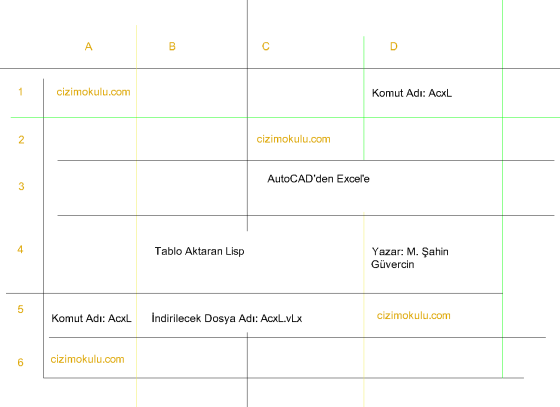
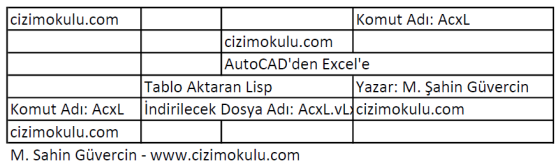
It will generate the following Excel file.
The function shared on our forum that exports tables from AutoCAD to Excel has received great interest from our members. However, it was observed that some users faced difficulties creating an AutoLISP file from the shared code, while others encountered errors for various reasons. Therefore, to ensure a seamless and hassle-free download, we decided to make the file available in our Download section.
The function directly exports data to an Excel file from a table where cells are defined by Line, Lwpolyline, or Polyline objects, and data consists of Text, Mtext, Field, or Block objects containing Attributes.
Rows and columns do not have to be uniform; staggered and merged cells are supported.
For multi-line MText objects or instances where multiple data objects are arranged vertically within the same cell, the data is transferred to the Excel cell as multiple rows of content. If a cell contains multiple data objects on the same horizontal line (equal Y-coordinates, different X-coordinates), only one of the objects is written. In this case, merging objects on the same line within a single cell is the user's responsibility.
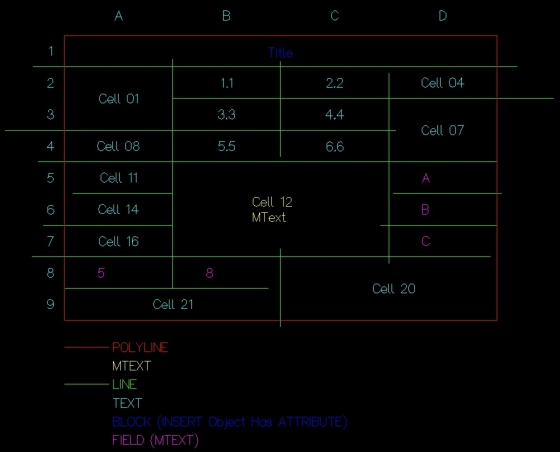
As shown in the image, INSERT (Block Reference) objects with attributes, along with TEXT, MTEXT, and FIELD objects, are recognized as the table's Data Objects.
Objects defining the table boundaries (cell borders) can be Line, Polyline, or Lwpolyline types.
Data areas (cells) can consist of a single cell or include merged cells. For merged cells, a rectangular definition area applies, in line with Excel's range logic.
When table elements are selected, objects that lack borders on all four sides (i.e., not enclosed within a cell) are excluded from the table and will not be processed. In the image, the column letters A, B, C, and D, as well as the row numbers 1 through 9, will not be processed as Data because they are not fully enclosed by boundary lines.
As also shown in the image, the lines defining the cell boundaries do not necessarily need to intersect. For a line to be recognized as a cell boundary, it only needs to intersect orthogonally in one of the four directions with the orthogonal lines passing through the data object's Insertion Point.
Under these specified conditions, it naturally follows that the lines defining the cell boundaries must be Orthogonal. If the row or column lines are not orthogonal, the program will assume there are other cells in between, causing the table to generate incorrectly.
In the Excel file, cell merging is performed and borders are created.
All data is exported in Excel's "General" format.
Alignment and font formatting, as well as saving the generated Excel file with the desired name and location, are left to the user.
Once the selection of the table objects is complete, it is normal to experience a noticeable delay while Excel launches and the necessary connections are established; please do not panic. When the function finishes and returns to the AutoCAD command line, you can switch to Excel by clicking the open Excel icon on the Taskbar to perform any desired actions on the file.
File Name to Download: AcxL.vLx
Author: cizimokulu.com
Description: VLX (Virtual LISP) formatted AutoLISP application file
Tag:
Comments :
No comment yet