


 Category Index


AutoLISP Function That Calculates and Writes Selected Object Areas and Total Area
This AutoLisp function calculates the area and total area of the selected objects, and writes to the selected point
admin - 22.05.2026 20:55
admin - 22.05.2026 20:55
**AutoLISP Function That Calculates and Writes Selected Object Areas and Total Area**
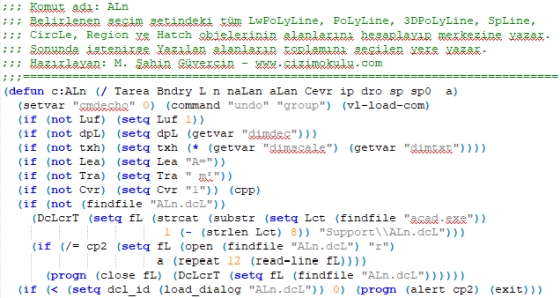
Command name: `ALn`
°°° **LWPolyline, 3DPolyline, Polyline, Spline, Ellipse, Circle, Region, and Hatch** objects can be selected individually or as a group.
°°° If a single object is selected, its area is written at the center of the object according to the specified criteria and the command ends. If multiple objects are selected, the area of each object is written at its center, and then the total area is written at a location specified by the user.
°°° Calculated areas are written at the centers of the selected objects using the currently active **Color, Layer, and Text Style**. The total area is written at the location selected by the user.
°°° When placing the total area text, the generated text is displayed on the screen and can be dragged and placed in the desired location. During dragging, if there is an existing **Text** or **MText** object under the pickbox, that text is highlighted to make the user aware. Clicking that point replaces the content of the selected Text or MText object with the total area. If an empty area is selected, a new Text object is created and the total area is written.
°°° If **Crossing** or **Window** selection is used, only the listed object types within the selected area are included.
°°° During selection, the **Add/Remove** feature is active. Objects can be removed from or added to the selection set as desired.
°°° For **Polyline**, **Spline**, and **Ellipse** objects, whether they are closed is not checked. This is the user's responsibility.
°°° If the vertices of a **3DPolyline** have different **Z coordinates**, its area is not calculated, not included in the total, and not written.
°°° **Area Unit / Drawing Unit**, number of decimal places, text height, and area text **prefix and suffix** can be easily specified through the dialog box. These settings are remembered until the drawing file is closed and restored the next time the function is run.
°°° If the drawing is prepared in **centimeters** and the areas should be displayed in **m²**, then:
**Area unit / Drawing unit → m/cm → 100/1 = 100** should be entered.
°°° Prefix and suffix values can be entered freely, or one or both fields may be left empty so only the numeric area value is displayed. Spaces are allowed in prefixes and suffixes.
Examples:
`"A="`, `"A= "`, `"m²"` or `" m²"`
* Optionally, the function was extended to also display the **perimeter values** together with the selected object areas. **Total perimeter is not calculated or displayed.**
Have a good workday.
Author: cizimokulu.com
Description: AutoLISP Function to That Calculates and Writes Selected Object Areas and Total Area
Tag:
Comments :
No comment yet